> ## Documentation Index
> Fetch the complete documentation index at: https://docs.getruba.com/llms.txt
> Use this file to discover all available pages before exploring further.
# Exchange User Consent for API Access
> Send a user through consent, exchange the code, and call Ruba on their behalf
export const RubaSocials = () => {
if (typeof document === "undefined") {
return null;
}
const inject = () => {
const footer = document.getElementById("footer");
if (!footer || document.getElementById("ruba-socials")) {
return false;
}
const isDark = document.querySelector("html.dark") || document.querySelector('html[class*="dark"]');
const lineColor = isDark ? "#383838" : "#e8e8ed";
const iconColor = isDark ? "#8e8e93" : "#86868b";
const markColor = isDark ? "#ffffff" : "#08080c";
const hoverColor = "#0071e3";
const div = document.createElement("div");
div.id = "ruba-socials";
div.style.cssText = `display:flex;align-items:center;gap:20px;padding-top:20px;margin-top:20px;border-top:1px solid ${lineColor};width:100%`;
const logo = `Ruba`;
const spacer = ``;
const ig = ``;
const li = ``;
const x = ``;
const github = ``;
div.innerHTML = logo + spacer + ig + li + x + github;
footer.appendChild(div);
return true;
};
if (!document.documentElement.dataset.rubaSocialsObserver) {
document.documentElement.dataset.rubaSocialsObserver = "true";
const observer = new MutationObserver(() => {
if (!document.getElementById("ruba-socials")) {
inject();
}
});
observer.observe(document.body, {
childList: true,
subtree: true
});
}
setTimeout(() => {
if (!inject()) {
const interval = setInterval(() => {
if (inject()) {
clearInterval(interval);
}
}, 500);
setTimeout(() => clearInterval(interval), 10000);
}
}, 300);
return null;
};
Ruba supports the OAuth 2.0 authorization-code flow with OpenID Connect. The user approves requested scopes in Ruba, your callback receives a one-use code, and your server exchanges it for tokens.
## 1. Send the user to consent
```text theme={"system"}
https://getruba.com/oauth2/authorize?
response_type=code
&client_id=CLIENT_ID
&redirect_uri=https%3A%2F%2Fexample.com%2Fcallback
&scope=openid%20email
```
| Parameter | Requirement |
| -------------------- | ------------------------------------------------------------------------ |
| `response_type=code` | Required; authorization code is the only supported flow |
| `client_id` | The identifier issued with the OAuth client |
| `redirect_uri` | An exact callback URI registered on that client |
| `scope` | Space-separated scopes that are also allowed by the client configuration |
These fields follow the [OpenID Connect authorization request](https://openid.net/specs/openid-connect-core-1_0.html#AuthRequest).
The resulting token acts as the consenting user. During consent, that user may restrict it to selected organizations; otherwise it covers all organizations they can access, including ones joined later. Access always follows current membership, so leaving an organization removes access. [Token introspection](/api-reference/oauth2/connect/introspect-token) returns the restriction in `organizations`; an empty array means no explicit organization restriction.
After approval, Ruba redirects to `redirect_uri?code=...`.
## 2. Exchange the one-use code
A confidential client sends its ID and secret to the token endpoint:
```bash theme={"system"}
curl -X POST https://api.getruba.com/v1/oauth2/token \
-H 'Content-Type: application/x-www-form-urlencoded' \
-d 'grant_type=authorization_code&code=AUTHORIZATION_CODE&client_id=CLIENT_ID&client_secret=CLIENT_SECRET&redirect_uri=https://example.com/callback'
```
```json theme={"system"}
{
"token_type": "Bearer",
"access_token": "ruba_at_XXX",
"expires_in": 864000,
"refresh_token": "ruba_rt_XXX",
"scope": "openid email",
"id_token": "ID_TOKEN"
}
```
Use `access_token` for API calls, retain `refresh_token` to obtain another access token after expiry, and validate `id_token` as the signed user identity described by the [OpenID Connect ID Token specification](https://openid.net/specs/openid-connect-core-1_0.html#IDToken).
## Public clients use PKCE
An SPA, mobile app, or device application cannot keep a client secret. When the OAuth client is explicitly configured as public, omit `client_secret` and complete [PKCE](https://oauth.net/2/pkce/) instead. Confidential clients must not use this exception.
## 3. Call the API
Place the access token in the Bearer authorization header:
```bash theme={"system"}
curl -X GET https://api.getruba.com/v1/oauth2/userinfo \
-H 'Authorization: Bearer ruba_at_XXX'
```
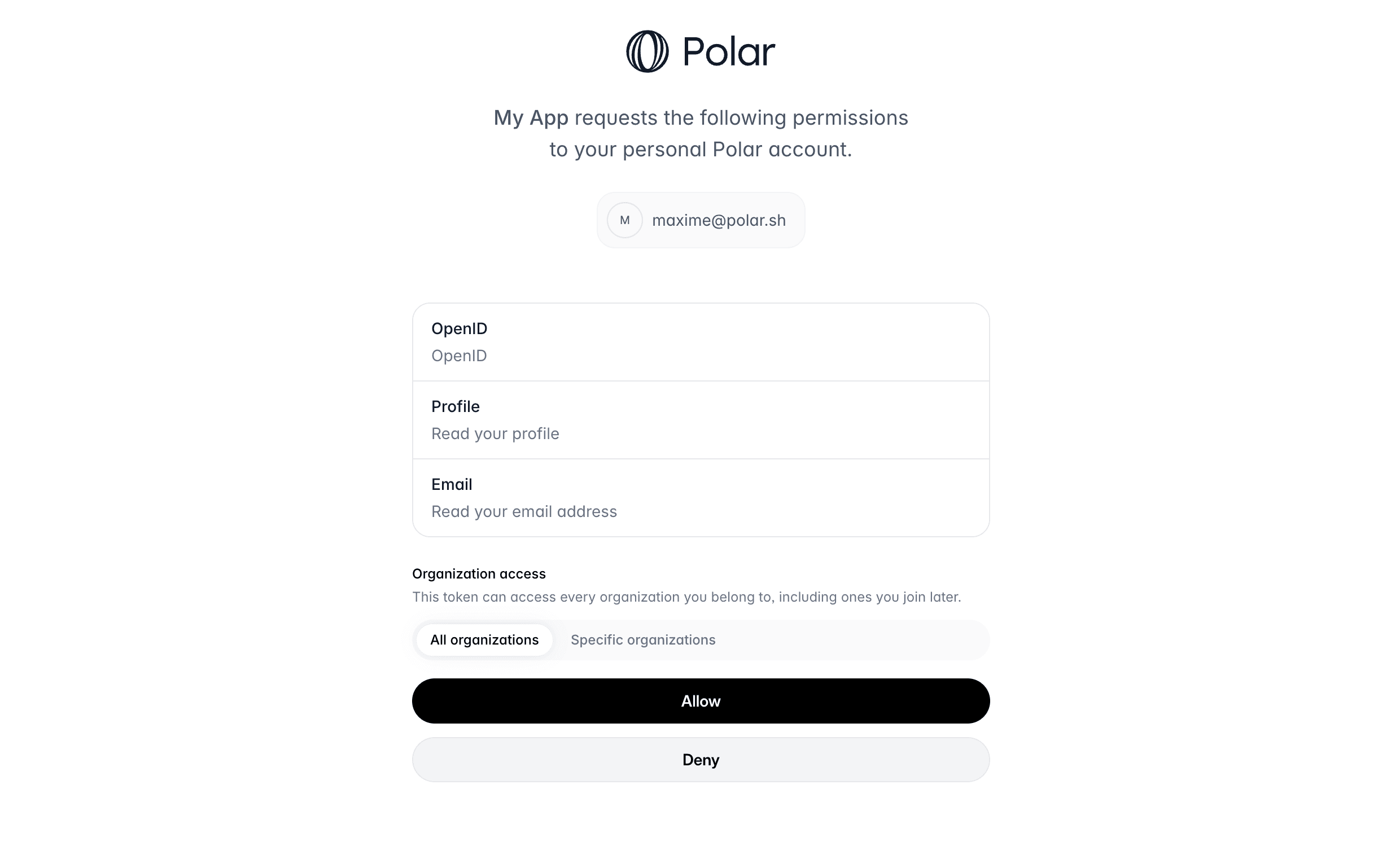 The resulting token acts as the consenting user. During consent, that user may restrict it to selected organizations; otherwise it covers all organizations they can access, including ones joined later. Access always follows current membership, so leaving an organization removes access. [Token introspection](/api-reference/oauth2/connect/introspect-token) returns the restriction in `organizations`; an empty array means no explicit organization restriction.
After approval, Ruba redirects to `redirect_uri?code=...`.
## 2. Exchange the one-use code
A confidential client sends its ID and secret to the token endpoint:
```bash theme={"system"}
curl -X POST https://api.getruba.com/v1/oauth2/token \
-H 'Content-Type: application/x-www-form-urlencoded' \
-d 'grant_type=authorization_code&code=AUTHORIZATION_CODE&client_id=CLIENT_ID&client_secret=CLIENT_SECRET&redirect_uri=https://example.com/callback'
```
```json theme={"system"}
{
"token_type": "Bearer",
"access_token": "ruba_at_XXX",
"expires_in": 864000,
"refresh_token": "ruba_rt_XXX",
"scope": "openid email",
"id_token": "ID_TOKEN"
}
```
Use `access_token` for API calls, retain `refresh_token` to obtain another access token after expiry, and validate `id_token` as the signed user identity described by the [OpenID Connect ID Token specification](https://openid.net/specs/openid-connect-core-1_0.html#IDToken).
## Public clients use PKCE
An SPA, mobile app, or device application cannot keep a client secret. When the OAuth client is explicitly configured as public, omit `client_secret` and complete [PKCE](https://oauth.net/2/pkce/) instead. Confidential clients must not use this exception.
## 3. Call the API
Place the access token in the Bearer authorization header:
```bash theme={"system"}
curl -X GET https://api.getruba.com/v1/oauth2/userinfo \
-H 'Authorization: Bearer ruba_at_XXX'
```
The resulting token acts as the consenting user. During consent, that user may restrict it to selected organizations; otherwise it covers all organizations they can access, including ones joined later. Access always follows current membership, so leaving an organization removes access. [Token introspection](/api-reference/oauth2/connect/introspect-token) returns the restriction in `organizations`; an empty array means no explicit organization restriction.
After approval, Ruba redirects to `redirect_uri?code=...`.
## 2. Exchange the one-use code
A confidential client sends its ID and secret to the token endpoint:
```bash theme={"system"}
curl -X POST https://api.getruba.com/v1/oauth2/token \
-H 'Content-Type: application/x-www-form-urlencoded' \
-d 'grant_type=authorization_code&code=AUTHORIZATION_CODE&client_id=CLIENT_ID&client_secret=CLIENT_SECRET&redirect_uri=https://example.com/callback'
```
```json theme={"system"}
{
"token_type": "Bearer",
"access_token": "ruba_at_XXX",
"expires_in": 864000,
"refresh_token": "ruba_rt_XXX",
"scope": "openid email",
"id_token": "ID_TOKEN"
}
```
Use `access_token` for API calls, retain `refresh_token` to obtain another access token after expiry, and validate `id_token` as the signed user identity described by the [OpenID Connect ID Token specification](https://openid.net/specs/openid-connect-core-1_0.html#IDToken).
## Public clients use PKCE
An SPA, mobile app, or device application cannot keep a client secret. When the OAuth client is explicitly configured as public, omit `client_secret` and complete [PKCE](https://oauth.net/2/pkce/) instead. Confidential clients must not use this exception.
## 3. Call the API
Place the access token in the Bearer authorization header:
```bash theme={"system"}
curl -X GET https://api.getruba.com/v1/oauth2/userinfo \
-H 'Authorization: Bearer ruba_at_XXX'
```