> ## Documentation Index
> Fetch the complete documentation index at: https://docs.getruba.com/llms.txt
> Use this file to discover all available pages before exploring further.
# Connect AI Tools to Ruba
> Supercharge your AI agents with Ruba's MCP Server
export const RubaSocials = () => {
if (typeof document === "undefined") {
return null;
}
const inject = () => {
const footer = document.getElementById("footer");
if (!footer || document.getElementById("ruba-socials")) {
return false;
}
const isDark = document.querySelector("html.dark") || document.querySelector('html[class*="dark"]');
const lineColor = isDark ? "#383838" : "#e8e8ed";
const iconColor = isDark ? "#8e8e93" : "#86868b";
const markColor = isDark ? "#ffffff" : "#08080c";
const hoverColor = "#0071e3";
const div = document.createElement("div");
div.id = "ruba-socials";
div.style.cssText = `display:flex;align-items:center;gap:20px;padding-top:20px;margin-top:20px;border-top:1px solid ${lineColor};width:100%`;
const logo = `Ruba`;
const spacer = ``;
const ig = ``;
const li = ``;
const x = ``;
const github = ``;
div.innerHTML = logo + spacer + ig + li + x + github;
footer.appendChild(div);
return true;
};
if (!document.documentElement.dataset.rubaSocialsObserver) {
document.documentElement.dataset.rubaSocialsObserver = "true";
const observer = new MutationObserver(() => {
if (!document.getElementById("ruba-socials")) {
inject();
}
});
observer.observe(document.body, {
childList: true,
subtree: true
});
}
setTimeout(() => {
if (!inject()) {
const interval = setInterval(() => {
if (inject()) {
clearInterval(interval);
}
}, 500);
setTimeout(() => clearInterval(interval), 10000);
}
}, 300);
return null;
};
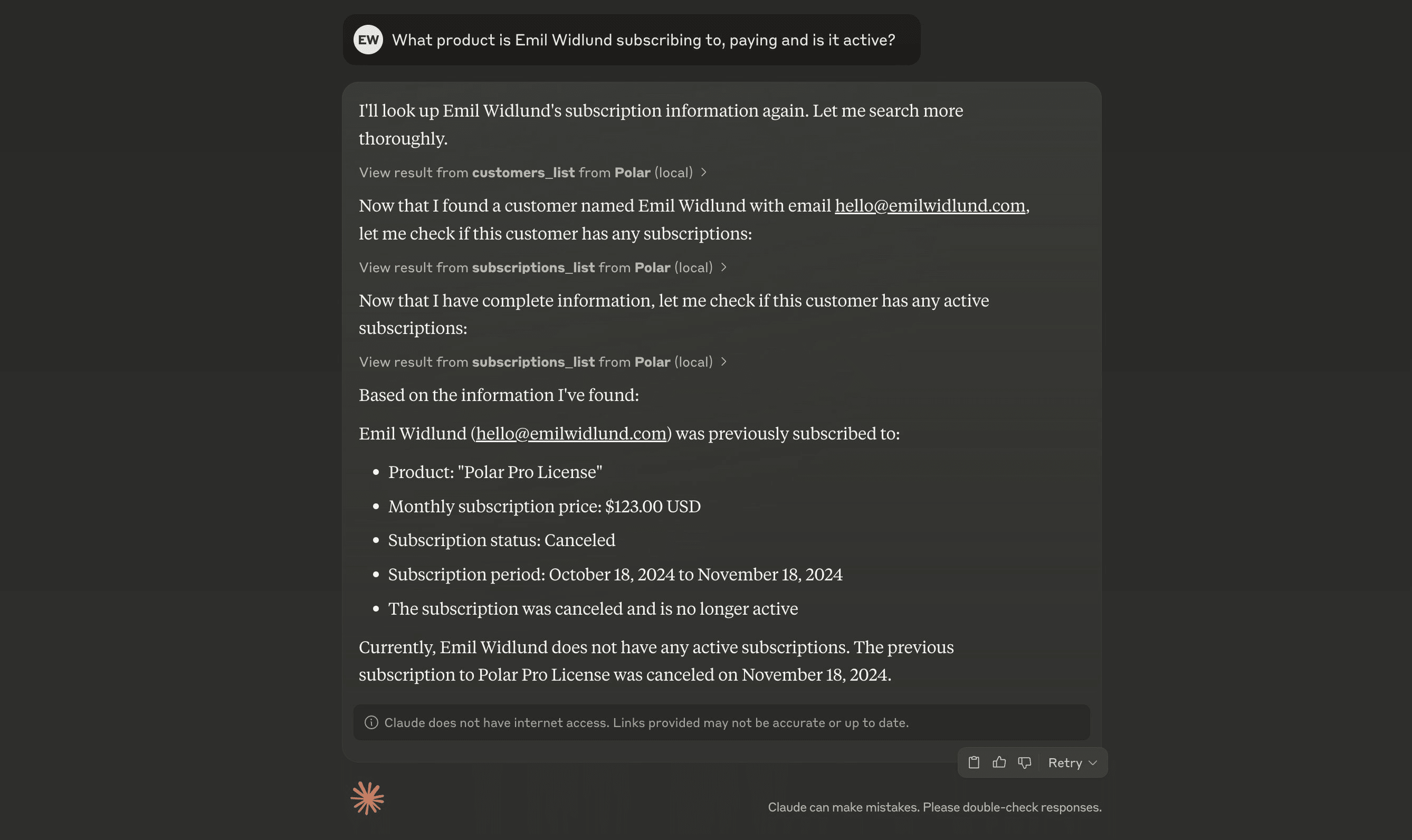
Empower your AI agents by connecting Ruba as a Model Context Protocol (MCP) server.
## What exactly is MCP?
MCP is a protocol for wiring tools into AI agents. It can substantially boost what your AI agents are capable of by feeding them real-time data and context.
Ruba hosts a remote MCP server that you can plug into from most AI clients.
## How it operates
You need an MCP-aware agent environment to use Ruba through MCP. A couple of well-known ones are Claude Desktop and Cursor.
## Linking up with Ruba MCP
Ruba provides two MCP servers:
* **Production**: `https://mcp.getruba.com/mcp/ruba` - Hook into your live Ruba organization
* **Sandbox**: `https://mcp.getruba.com/mcp/ruba-sandbox` - Hook into the Ruba sandbox environment for testing
When you can enter a MCP URL, pick one of the URLs above based on your environment.
If you must specify a command, use:
```json theme={"system"}
{
"mcpServers": {
"Ruba": {
"command": "npx",
"args": ["mcp-remote", "https://mcp.getruba.com/mcp/ruba"]
}
}
}
```
For sandbox:
```json theme={"system"}
{
"mcpServers": {
"Ruba Sandbox": {
"command": "npx",
"args": ["mcp-remote", "https://mcp.getruba.com/mcp/ruba-sandbox"]
}
}
}
```
### Cursor
Inside `.cursor/mcp.json`, add:
```json theme={"system"}
{
"mcpServers": {
"Ruba": {
"url": "https://mcp.getruba.com/mcp/ruba"
}
}
}
```
For sandbox:
```json theme={"system"}
{
"mcpServers": {
"Ruba Sandbox": {
"url": "https://mcp.getruba.com/mcp/ruba-sandbox"
}
}
}
```
### Windsurf
Inside `mcp_config.json`, add:
```json theme={"system"}
{
"mcpServers": {
"Ruba": {
"command": "npx",
"args": ["mcp-remote", "https://mcp.getruba.com/mcp/ruba"]
}
}
}
```
For sandbox:
```json theme={"system"}
{
"mcpServers": {
"Ruba Sandbox": {
"command": "npx",
"args": ["mcp-remote", "https://mcp.getruba.com/mcp/ruba-sandbox"]
}
}
}
```
### Codex
Append the following to your `~/.codex/config.toml`:
```toml theme={"system"}
[features]
rmcp_client = true
[mcp_servers.ruba]
type = "http"
url = "https://mcp.getruba.com/mcp/ruba"
```
Then run:
```sh theme={"system"}
codex mcp login ruba
```
For sandbox:
```toml theme={"system"}
[features]
rmcp_client = true
[mcp_servers.ruba_sandbox]
type = "http"
url = "https://mcp.getruba.com/mcp/ruba-sandbox"
```
Then run:
```sh theme={"system"}
codex mcp login ruba_sandbox
```
### Claude Code
Run the following command:
```
claude mcp add --transport http "Ruba" "https://mcp.getruba.com/mcp/ruba"
```
For sandbox:
```
claude mcp add --transport http "Ruba-Sandbox" "https://mcp.getruba.com/mcp/ruba-sandbox"
```
### OpenCode
Inside `opencode.jsonc`, add:
```jsonc theme={"system"}
{
"$schema": "https://opencode.ai/config.json",
"mcp": {
"Ruba": {
"type": "remote",
"url": "https://mcp.getruba.com/mcp/ruba"
}
}
}
```
For sandbox:
```jsonc theme={"system"}
{
"$schema": "https://opencode.ai/config.json",
"mcp": {
"Ruba Sandbox": {
"type": "remote",
"url": "https://mcp.getruba.com/mcp/ruba-sandbox"
}
}
}
```
### ChatGPT
MCP is currently available only to paid users in beta on ChatGPT web, by turning on Developer Mode.
Once Developer Mode is active, head to *Settings* → *Connectors* and register the MCP server using `https://mcp.getruba.com/mcp/ruba`.
For sandbox, use `https://mcp.getruba.com/mcp/ruba-sandbox` instead.
### Claude Desktop
Head to *Settings* → *Connectors* and click *Add custom connector*.
Name it "Ruba" and supply `https://mcp.getruba.com/mcp/ruba` as the server URL.
For sandbox, use `https://mcp.getruba.com/mcp/ruba-sandbox` as the server URL instead.
Save, then click *Connect* to link up with your Ruba organization.
 Empower your AI agents by connecting Ruba as a Model Context Protocol (MCP) server.
## What exactly is MCP?
MCP is a protocol for wiring tools into AI agents. It can substantially boost what your AI agents are capable of by feeding them real-time data and context.
Ruba hosts a remote MCP server that you can plug into from most AI clients.
## How it operates
You need an MCP-aware agent environment to use Ruba through MCP. A couple of well-known ones are Claude Desktop and Cursor.
## Linking up with Ruba MCP
Ruba provides two MCP servers:
* **Production**: `https://mcp.getruba.com/mcp/ruba` - Hook into your live Ruba organization
* **Sandbox**: `https://mcp.getruba.com/mcp/ruba-sandbox` - Hook into the Ruba sandbox environment for testing
When you can enter a MCP URL, pick one of the URLs above based on your environment.
If you must specify a command, use:
```json theme={"system"}
{
"mcpServers": {
"Ruba": {
"command": "npx",
"args": ["mcp-remote", "https://mcp.getruba.com/mcp/ruba"]
}
}
}
```
For sandbox:
```json theme={"system"}
{
"mcpServers": {
"Ruba Sandbox": {
"command": "npx",
"args": ["mcp-remote", "https://mcp.getruba.com/mcp/ruba-sandbox"]
}
}
}
```
### Cursor
Inside `.cursor/mcp.json`, add:
```json theme={"system"}
{
"mcpServers": {
"Ruba": {
"url": "https://mcp.getruba.com/mcp/ruba"
}
}
}
```
For sandbox:
```json theme={"system"}
{
"mcpServers": {
"Ruba Sandbox": {
"url": "https://mcp.getruba.com/mcp/ruba-sandbox"
}
}
}
```
### Windsurf
Inside `mcp_config.json`, add:
```json theme={"system"}
{
"mcpServers": {
"Ruba": {
"command": "npx",
"args": ["mcp-remote", "https://mcp.getruba.com/mcp/ruba"]
}
}
}
```
For sandbox:
```json theme={"system"}
{
"mcpServers": {
"Ruba Sandbox": {
"command": "npx",
"args": ["mcp-remote", "https://mcp.getruba.com/mcp/ruba-sandbox"]
}
}
}
```
### Codex
Append the following to your `~/.codex/config.toml`:
```toml theme={"system"}
[features]
rmcp_client = true
[mcp_servers.ruba]
type = "http"
url = "https://mcp.getruba.com/mcp/ruba"
```
Then run:
```sh theme={"system"}
codex mcp login ruba
```
For sandbox:
```toml theme={"system"}
[features]
rmcp_client = true
[mcp_servers.ruba_sandbox]
type = "http"
url = "https://mcp.getruba.com/mcp/ruba-sandbox"
```
Then run:
```sh theme={"system"}
codex mcp login ruba_sandbox
```
### Claude Code
Run the following command:
```
claude mcp add --transport http "Ruba" "https://mcp.getruba.com/mcp/ruba"
```
For sandbox:
```
claude mcp add --transport http "Ruba-Sandbox" "https://mcp.getruba.com/mcp/ruba-sandbox"
```
### OpenCode
Inside `opencode.jsonc`, add:
```jsonc theme={"system"}
{
"$schema": "https://opencode.ai/config.json",
"mcp": {
"Ruba": {
"type": "remote",
"url": "https://mcp.getruba.com/mcp/ruba"
}
}
}
```
For sandbox:
```jsonc theme={"system"}
{
"$schema": "https://opencode.ai/config.json",
"mcp": {
"Ruba Sandbox": {
"type": "remote",
"url": "https://mcp.getruba.com/mcp/ruba-sandbox"
}
}
}
```
### ChatGPT
MCP is currently available only to paid users in beta on ChatGPT web, by turning on Developer Mode.
Once Developer Mode is active, head to *Settings* → *Connectors* and register the MCP server using `https://mcp.getruba.com/mcp/ruba`.
For sandbox, use `https://mcp.getruba.com/mcp/ruba-sandbox` instead.
### Claude Desktop
Head to *Settings* → *Connectors* and click *Add custom connector*.
Name it "Ruba" and supply `https://mcp.getruba.com/mcp/ruba` as the server URL.
For sandbox, use `https://mcp.getruba.com/mcp/ruba-sandbox` as the server URL instead.
Save, then click *Connect* to link up with your Ruba organization.
Empower your AI agents by connecting Ruba as a Model Context Protocol (MCP) server.
## What exactly is MCP?
MCP is a protocol for wiring tools into AI agents. It can substantially boost what your AI agents are capable of by feeding them real-time data and context.
Ruba hosts a remote MCP server that you can plug into from most AI clients.
## How it operates
You need an MCP-aware agent environment to use Ruba through MCP. A couple of well-known ones are Claude Desktop and Cursor.
## Linking up with Ruba MCP
Ruba provides two MCP servers:
* **Production**: `https://mcp.getruba.com/mcp/ruba` - Hook into your live Ruba organization
* **Sandbox**: `https://mcp.getruba.com/mcp/ruba-sandbox` - Hook into the Ruba sandbox environment for testing
When you can enter a MCP URL, pick one of the URLs above based on your environment.
If you must specify a command, use:
```json theme={"system"}
{
"mcpServers": {
"Ruba": {
"command": "npx",
"args": ["mcp-remote", "https://mcp.getruba.com/mcp/ruba"]
}
}
}
```
For sandbox:
```json theme={"system"}
{
"mcpServers": {
"Ruba Sandbox": {
"command": "npx",
"args": ["mcp-remote", "https://mcp.getruba.com/mcp/ruba-sandbox"]
}
}
}
```
### Cursor
Inside `.cursor/mcp.json`, add:
```json theme={"system"}
{
"mcpServers": {
"Ruba": {
"url": "https://mcp.getruba.com/mcp/ruba"
}
}
}
```
For sandbox:
```json theme={"system"}
{
"mcpServers": {
"Ruba Sandbox": {
"url": "https://mcp.getruba.com/mcp/ruba-sandbox"
}
}
}
```
### Windsurf
Inside `mcp_config.json`, add:
```json theme={"system"}
{
"mcpServers": {
"Ruba": {
"command": "npx",
"args": ["mcp-remote", "https://mcp.getruba.com/mcp/ruba"]
}
}
}
```
For sandbox:
```json theme={"system"}
{
"mcpServers": {
"Ruba Sandbox": {
"command": "npx",
"args": ["mcp-remote", "https://mcp.getruba.com/mcp/ruba-sandbox"]
}
}
}
```
### Codex
Append the following to your `~/.codex/config.toml`:
```toml theme={"system"}
[features]
rmcp_client = true
[mcp_servers.ruba]
type = "http"
url = "https://mcp.getruba.com/mcp/ruba"
```
Then run:
```sh theme={"system"}
codex mcp login ruba
```
For sandbox:
```toml theme={"system"}
[features]
rmcp_client = true
[mcp_servers.ruba_sandbox]
type = "http"
url = "https://mcp.getruba.com/mcp/ruba-sandbox"
```
Then run:
```sh theme={"system"}
codex mcp login ruba_sandbox
```
### Claude Code
Run the following command:
```
claude mcp add --transport http "Ruba" "https://mcp.getruba.com/mcp/ruba"
```
For sandbox:
```
claude mcp add --transport http "Ruba-Sandbox" "https://mcp.getruba.com/mcp/ruba-sandbox"
```
### OpenCode
Inside `opencode.jsonc`, add:
```jsonc theme={"system"}
{
"$schema": "https://opencode.ai/config.json",
"mcp": {
"Ruba": {
"type": "remote",
"url": "https://mcp.getruba.com/mcp/ruba"
}
}
}
```
For sandbox:
```jsonc theme={"system"}
{
"$schema": "https://opencode.ai/config.json",
"mcp": {
"Ruba Sandbox": {
"type": "remote",
"url": "https://mcp.getruba.com/mcp/ruba-sandbox"
}
}
}
```
### ChatGPT
MCP is currently available only to paid users in beta on ChatGPT web, by turning on Developer Mode.
Once Developer Mode is active, head to *Settings* → *Connectors* and register the MCP server using `https://mcp.getruba.com/mcp/ruba`.
For sandbox, use `https://mcp.getruba.com/mcp/ruba-sandbox` instead.
### Claude Desktop
Head to *Settings* → *Connectors* and click *Add custom connector*.
Name it "Ruba" and supply `https://mcp.getruba.com/mcp/ruba` as the server URL.
For sandbox, use `https://mcp.getruba.com/mcp/ruba-sandbox` as the server URL instead.
Save, then click *Connect* to link up with your Ruba organization.